Flow Management
Environments
The Environments menu is used to manage environment configurations and keep them synchronized with source systems.
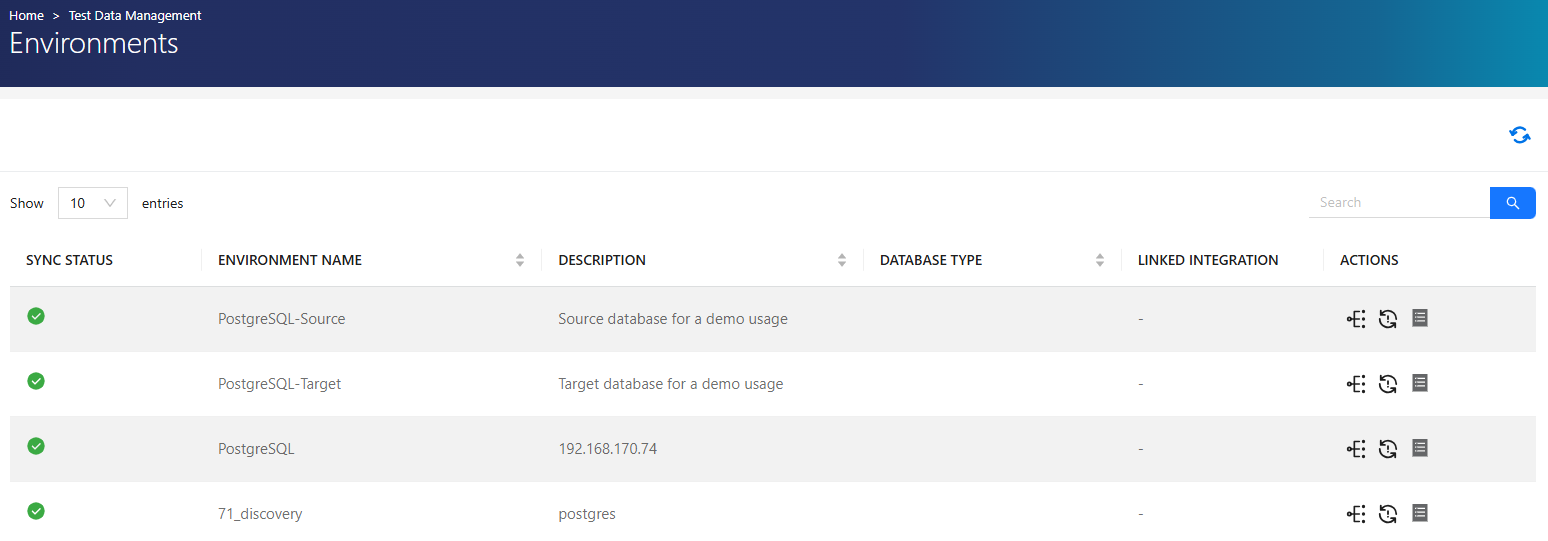
Actions
| Action | Description |
|---|---|
 Integration Mapping |
Defines mappings between environments and integration sources. |
 Synchronize |
Triggers synchronization to fetch latest metadata/structure from sources. |
 Logs |
Displays synchronization logs and allows download. |
Synthetic Flows
Synthetic Flows define data generation configurations.
- The page lists existing flows.
- New flows can be created by selecting an environment.
- Schema and table relationships are automatically retrieved from the database.
- Flows cannot be deleted if they are currently in use.
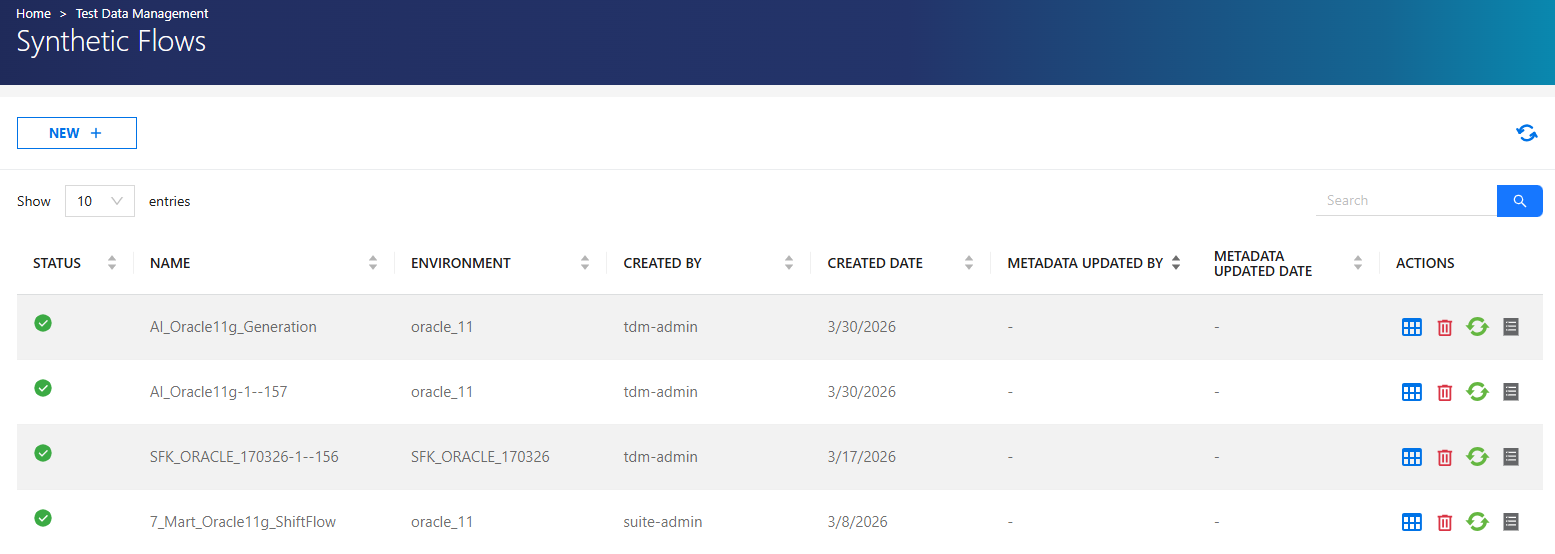
Actions
| Action | Description |
|---|---|
 |
Deletes the synthetic flow. |
 |
Configures data generation settings. |
 |
Checks schema/table changes. |
 |
Indicates updates are applied. |
|
Displays log details. |
 |
Opens flow creation page. |
Create a New Synthetic Flow
To create a new flow:
- Click NEW.
- Enter:
- Name
- Environment
- Schemas
- Tables
If no table is selected, all tables in the environment are included.
Options
-
Smart Flow Creation: Splits selected tables into multiple flows (max 100 tables per flow).
-
Use Discovery Integration: Applies scan and rule sets from connected discovery integrations.
Synthetic Flow Configuration
Table Configuration
Includes:
- Flow Edit
- ER Diagram
- Config
- Bulk Edit
- Assign with AI
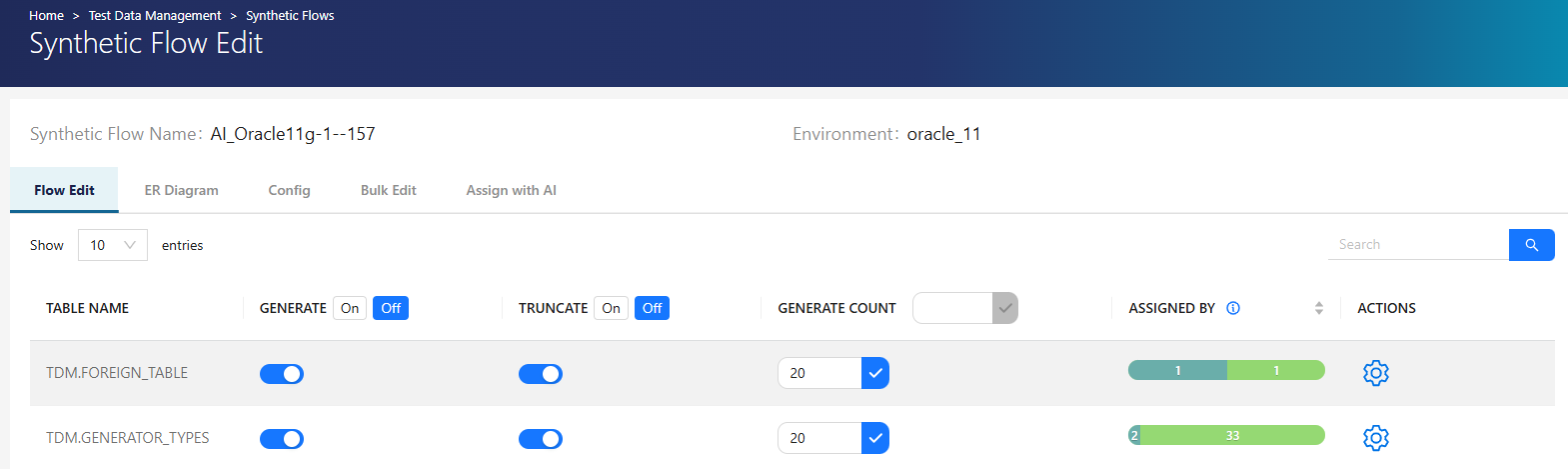
Flow Edit
- Enable/disable generation using GENERATE
- Set row count
- Enable TRUNCATE to clear table before generation
Note
In a single synthetic data generation run:
- A maximum of 100 tables can be generated
- Each table can contain up to 30K rows
- The total data generation limit is 1 million rows
Column Configuration
- Default rules are assigned automatically
- Users can modify rules per column
- Generator types are assigned based on data type
Red icon indicates that there are some updates on the related column.
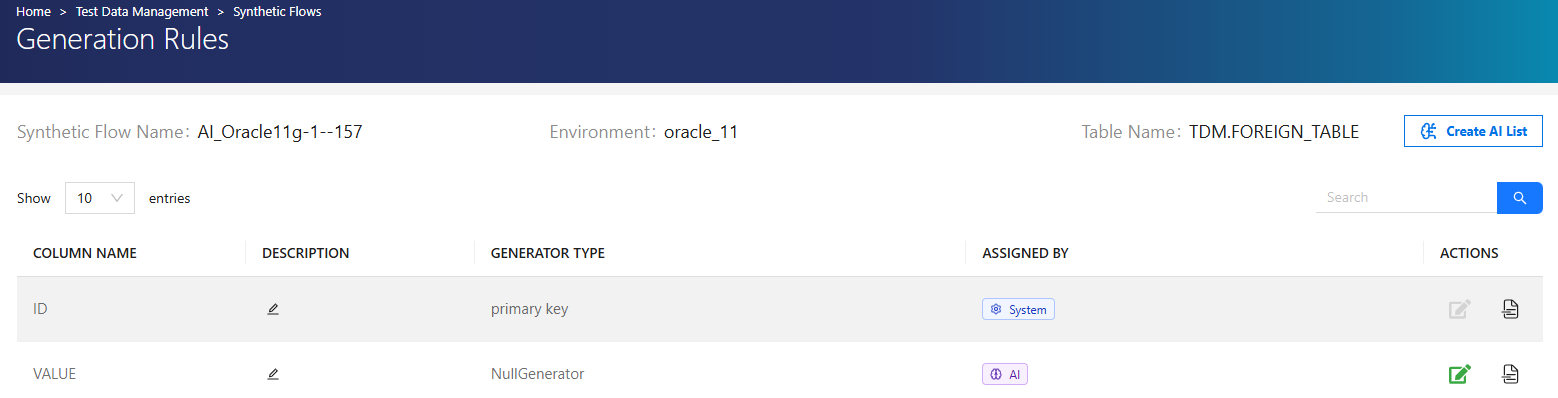
Actions
| Action | Description |
|---|---|
 |
Defines the alias name for the column in the generated output after the synthetic flow execution. |
 |
Updates the generator details. |
 |
Quickly generate lists with AI. |
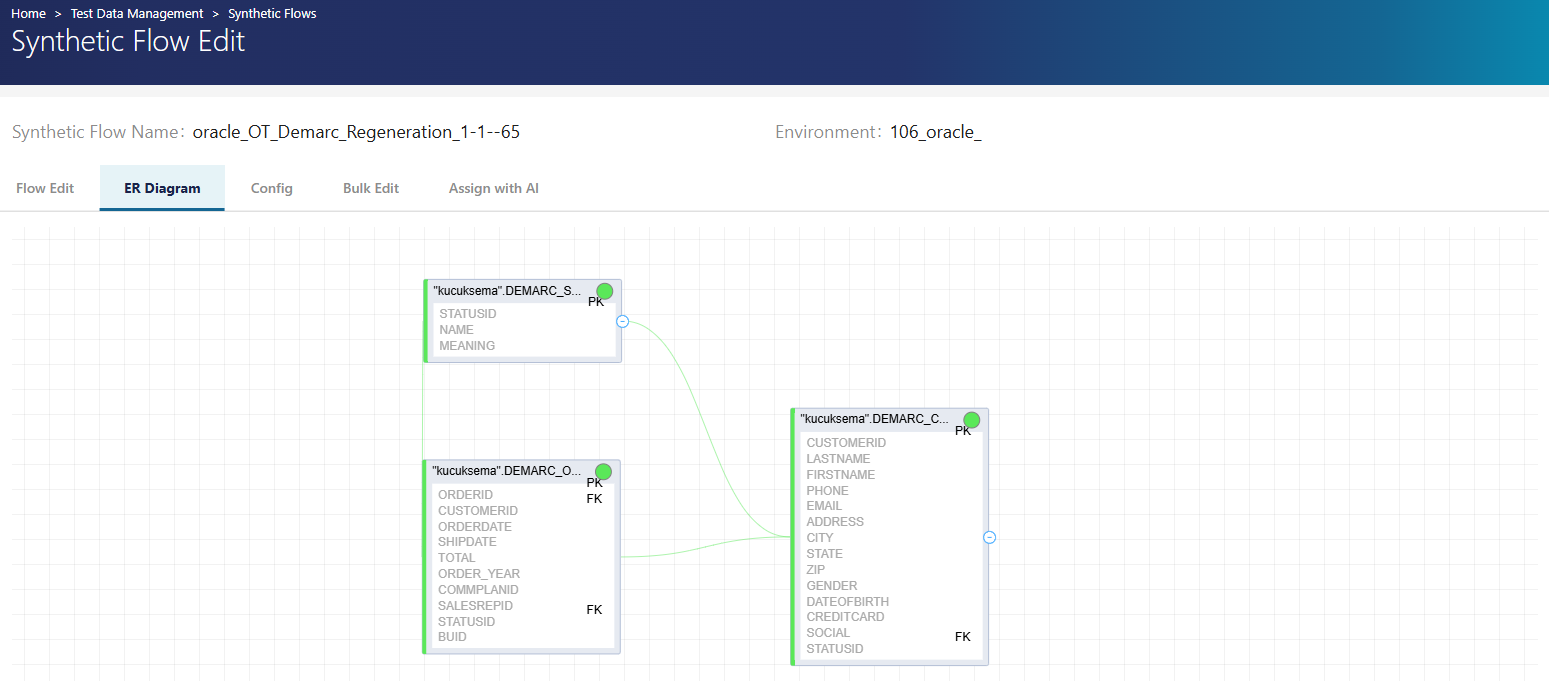
ER Diagram
- Visualizes table relationships
- Green → Generated data
- Purple → Not generated
- Shows PK (Primary Key) and FK (Foreign Key)
Config
- Default Locale → Controls localization
- Bypass Environment Sync → Skips sync validation
- Regenerate → Regenerates all enabled tables (with truncate)

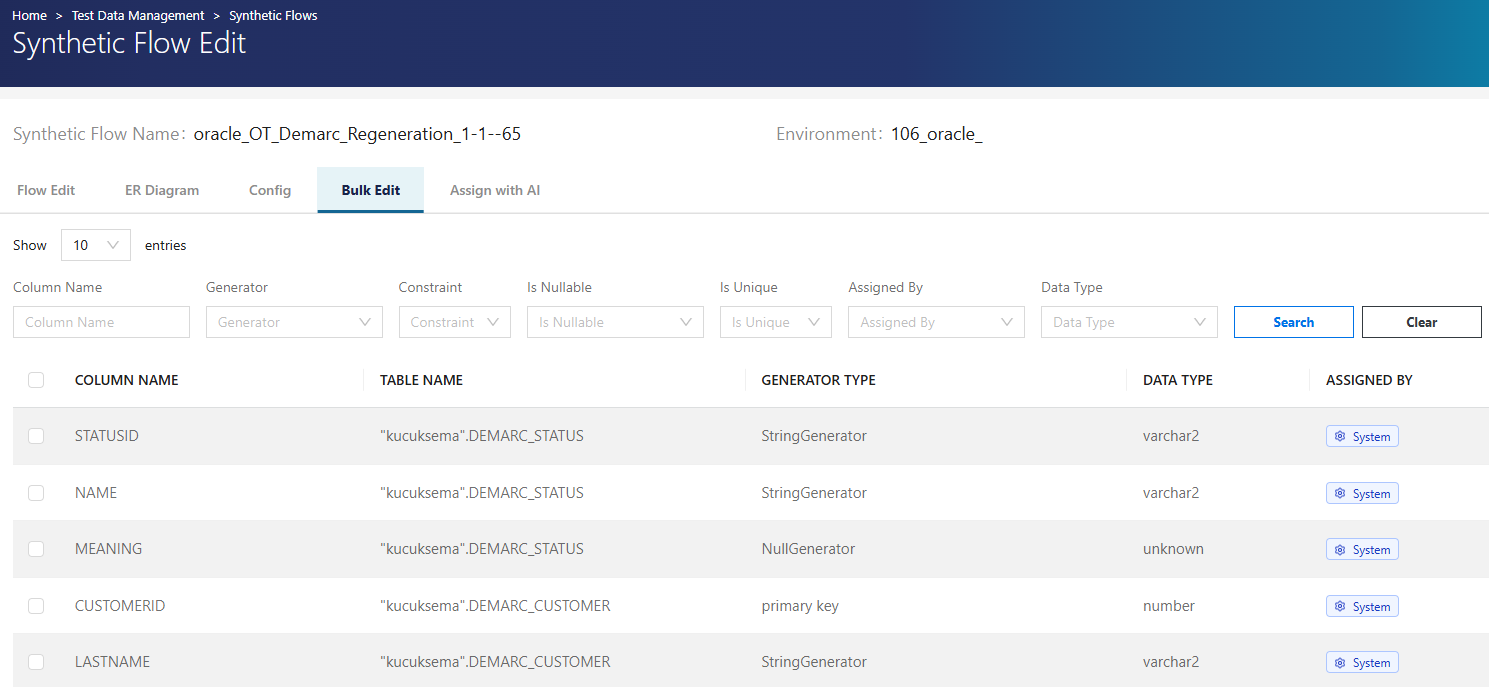
Bulk Edit
- Modify multiple generators at once
- Supports filtering and batch updates
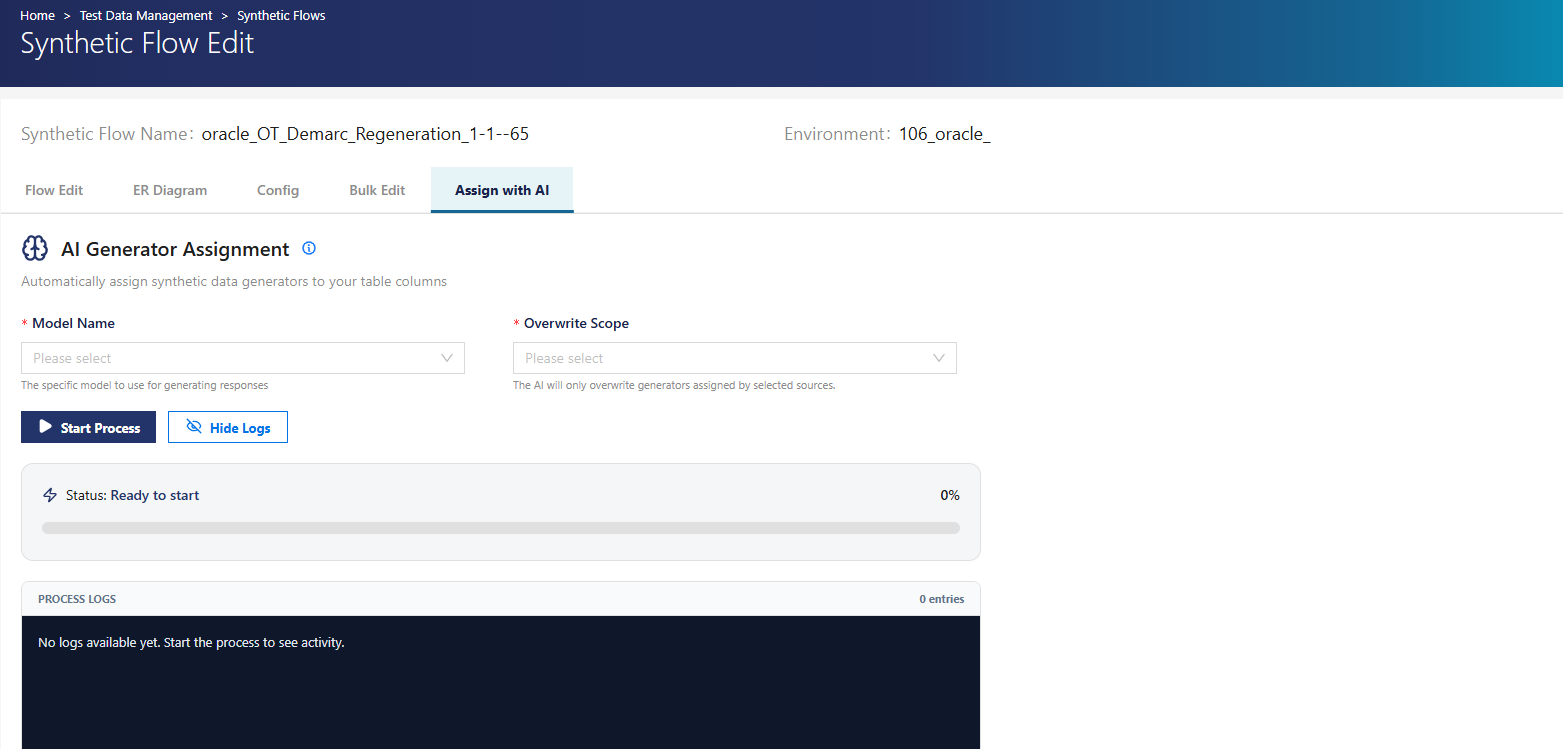
Assign with AI
Analyzes the data distribution of the column and generates new values accordingly.
AI-generated assignments should be reviewed for accuracy, as the success rate may vary depending on the selected model.
Default Generators
Data types and their default generators are listed in the table below. These assignments are made during the creation or update of a synthetic flow.
| Data Type | Generator |
|---|---|
| numeric, real, double_precision, float, decimal, number, double | FloatGenerator |
| character, character varying, char, nchar, varchar, varchar2, nvarchar, nvarchar2, tinytext, mediumtext, longtext, text, ntext | TextGenerator |
| tinyint, smallint, int, integer, mediumint, bigint, smallserial, bigserial | IntegerGenerator |
| boolean, bit | BooleanGenerator |
| uniqueidentifier, uuid | UUIDGenerator |
| date | DateGenerator |
| timestamp, datetime, datetime2, datetimeoffset ,smalldatetime | DatetimeGenerator |
Notes
- If one of the assigned datatypes for the TextGenerator is the column type of the primary key, the StringGenerator will be assigned.
- If one of the assigned datatypes for the UUIDGenerator is the column type of the primary key, the UUIDGenerator will be assigned.
- For primary keys outside of these types, the Primary Generator is assigned.
- If there is a foreign key constraint on the column, the Foreign Generator will be assigned regardless of its type.
- For columns with an undefined/unsupported datatype, the DataReplicator is assigned if the column is not unique; if it is unique, the StringGenerator is assigned, and the column type is set to unknown.
Generator Types
Below are the available generator types and their configurations:
-
Email Generator: Generates multi-domain emails by combining selected column values. Users can choose domains from a predefined list or enter them manually. A separator can be defined or left empty.
-
First Name / Last Name Generator: Generates names based on the selected language.
-
Password Generator: Generates passwords.
- Use a fixed value for all rows, or
- Leave empty to generate random passwords per row.
-
Text Generator: Generates random Latin text.
Parameters:
- Context:
sentence,paragraph, ortext - Amount:
- Sentence: Number of words
- Paragraph: Number of sentences (each 3–8 words)
- Text: Approximate character length (minimum: 5)
- Context:
-
Full Address Generator: Generates address data based on selected country.
-
UUID Generator: Generates random UUID values.
-
Integer / Float / String Generator: Generates numeric or string data.
Parameters:
- Min Chars: Minimum length
- Max Chars: Maximum length
- Prefix: Optional prefix
- Suffix: Optional suffix
Output: Random values within the defined constraints.
-
Date / Datetime Generator: Generates date or datetime values within a specified range.
-
Data Replicator: Uses existing column data without modification.
-
Boolean Generator: Generates boolean values.
- Based on defined percentages, or
- Randomly if not specified.
-
Phone Number Generator: Generates formatted phone numbers using
- Location
- Mobile / Static options
-
Image URL Generator: Generates image URLs based on specified width and height.
-
Regex Generator: Generates data using custom or predefined regular expressions.
-
Blood Group Generator: Generates random blood group values.
-
File URL Generator: Generates random file URLs.
-
Null Generator: Generates
nullvalues. -
City Generator: Generates city names based on location.
-
Country Generator: Generates random country names.
-
Credit Card Number Generator: Generates credit card numbers based on
- Card type (e.g., Visa, Mastercard, Amex)
- Optional percentage distribution
-
IBAN Generator: Generates IBAN values based on selected country.
-
Postal Code Generator: Generates postal codes based on location.
-
Street Generator: Generates street names based on location.
-
Hash Generator: Generates hash values based on selected hash type.
-
Referential Integrity Generator: Ensures consistency with a reference column by
- Selecting reference name and column
- Optionally enforcing unique values
-
City From Country Generator: Generates cities based on the country column in the same table.
-
Relative Date / Datetime Generator: Generates dates relative to another column’s date value.
-
AI Generator: Analyzes data distribution and generates new values accordingly. Generated data should be reviewed, as accuracy depends on the selected model.
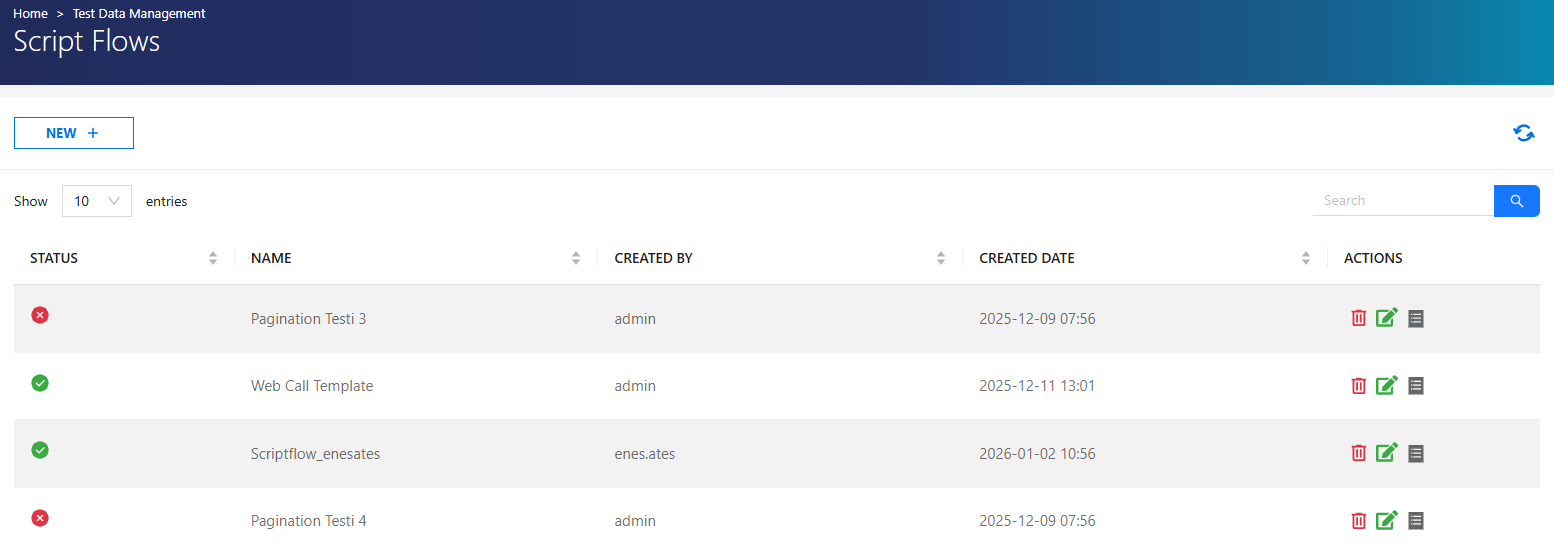
Script Flows
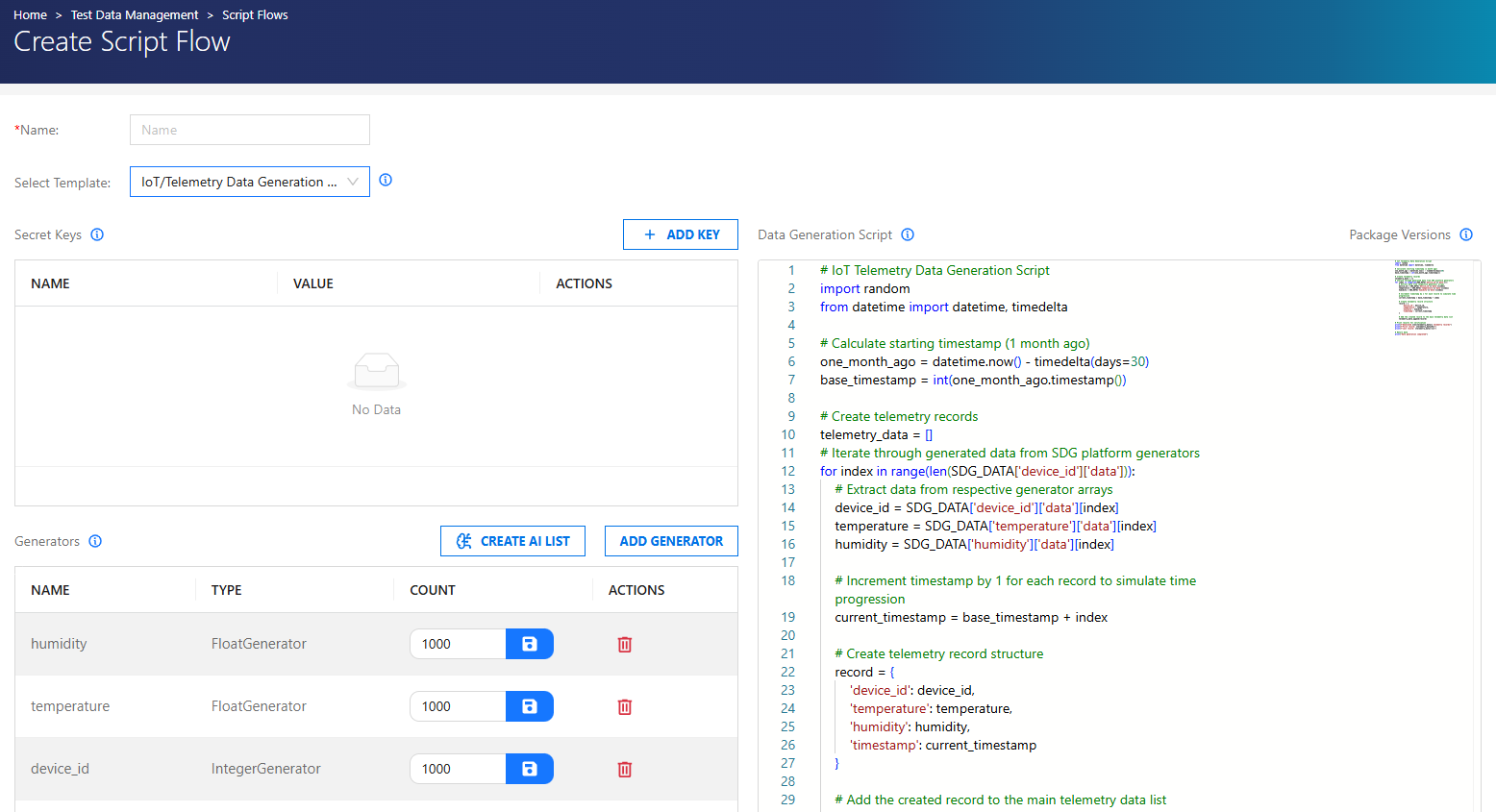
Script Flows enable data generation using Python scripts.
- The Script Flow page displays a list of existing flows.
- Users can create new flows using predefined templates.
- Templates provide ready-to-use structures for faster configuration and execution.
Available Templates
-
Web Service Call
Enables direct API interactions with automated authentication and structured payload handling. -
MongoDB Data Insert
Simplifies database operations with secure credential management and standardized connections. -
IoT Telemetry Data Generation
Simulates time-series IoT data with timestamps and device-specific metrics.
Create a New Script Flow
- Click +NEW.
- Enter a Name.
- (Optional) Select a Template.
- Modify the predefined:
- Keys
- Generators
- Script
- Click Save.
Components
-
Secret Keys
Used to define sensitive parameters (e.g., passwords) that should not be visible in scripts. -
Generators
Provide data inputs used within the script. -
Data Generation Script
Contains the Python script.
Keys and generators are referenced parametrically using their defined names.
Note:
Usage of keys and generators is explained via the Info buttons in the interface.
Shift Flow
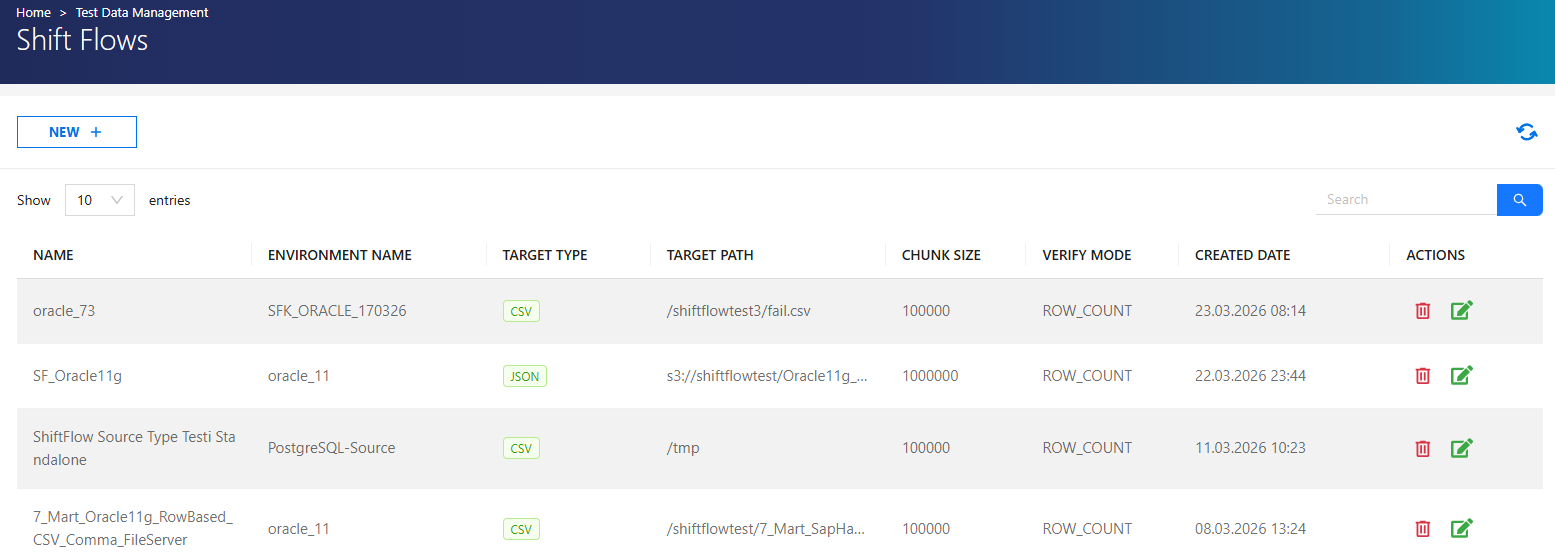
Shift Flow is used to export data from database tables to a target file. The page allows listing, editing, and deleting existing shift flows.
Create a New Shift Flow
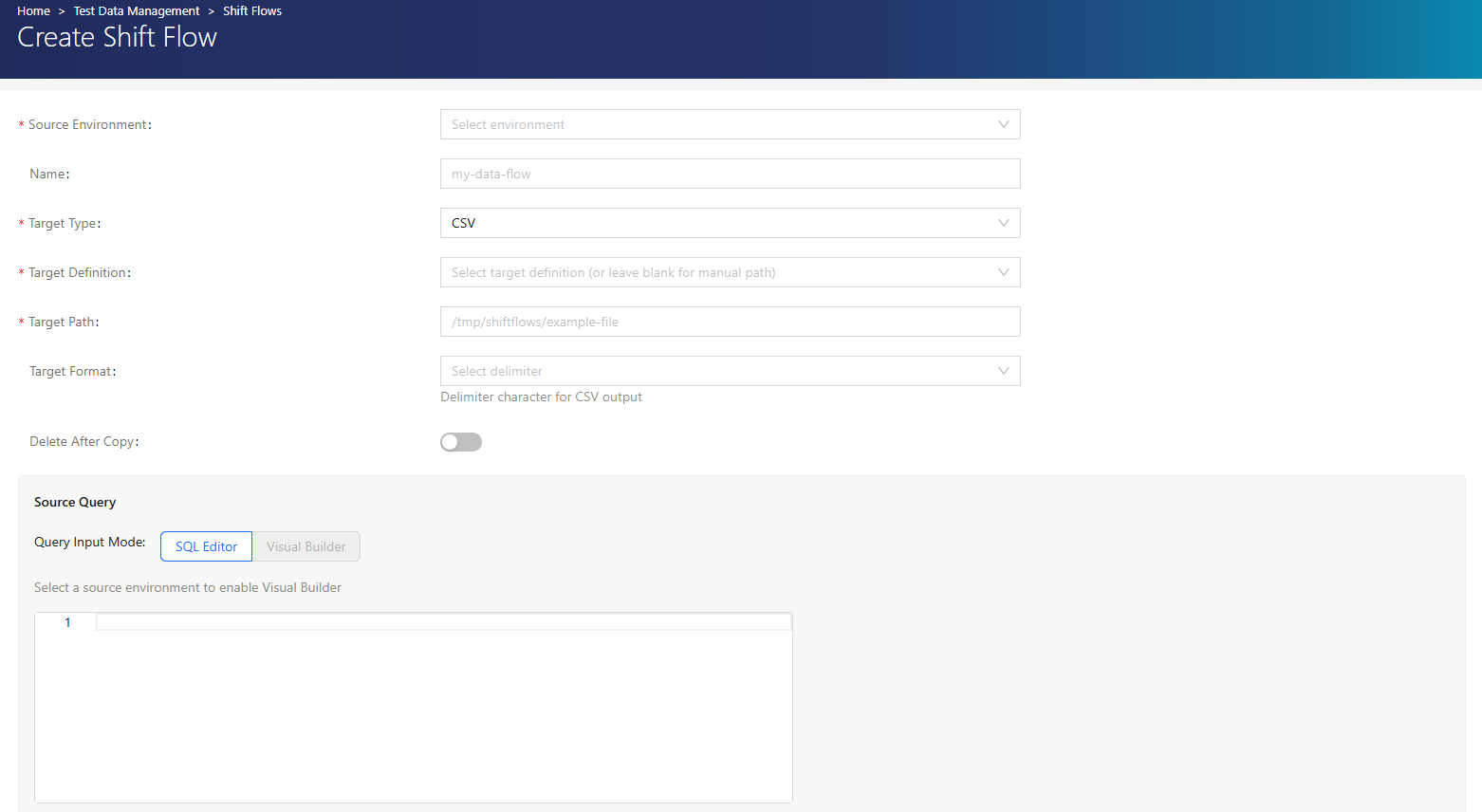
- Click +NEW.
- Configure:
- Source
- Target
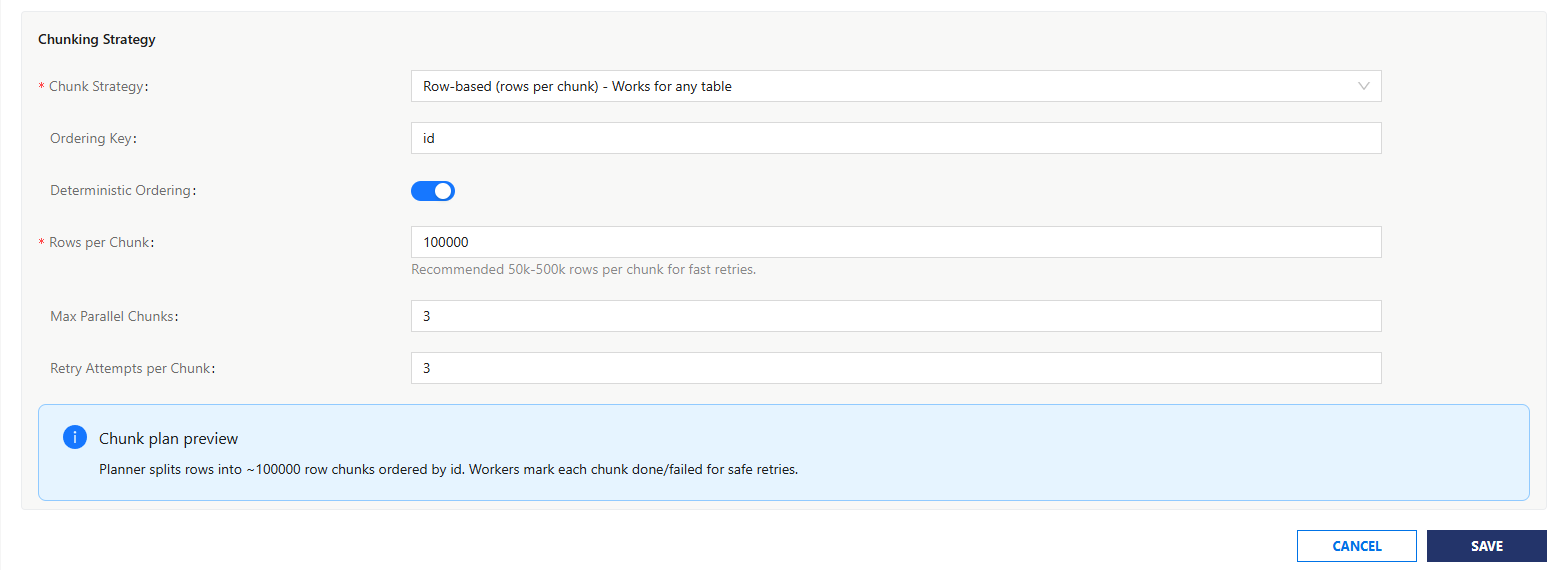
- Chunking Strategy
Source Query Options
-
SQL Editor: Write a custom
SELECTquery manually. -
Visual Builder: Select schema and table; query is generated automatically.
Target Definition
- Managed via: Settings → Target Definition
Chunking Strategy
-
Row-based: Transfers data row by row.
-
Key Range: Transfers data based on a key column using defined start and end values.
Flow Management Authorization
| Role | Permissions |
|---|---|
| Admin | Full access to all operations |
| Test Manager | Access to authorized Synthetic Flows, all Script Flows, and Shift Flows |
| Tester | No access |